You can sort the list of foods you have chosen according to nutrient content, food groups, the extent to which they may help you meet nutritional goals, or cost.
After this lesson, you will be able to sort the list of foods you have already chosen:
You will also be able to:
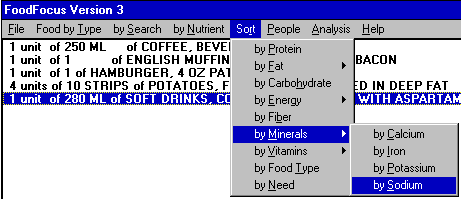
Lesson 1 described the Do, Learn, Improve, Record cycle for which FoodFocus was designed. The Do (choose foods), Learn (review nutrient analysis results) and the Record (using files and printing) activities are relatively straightforward. The Improve phase requires more understanding and judgement. Lesson 8 described how to make changes by changing food quantities and deleting foods. This lesson helps you identify the changes that will be most effective to meet goals. Sorting can be a powerful tool to help develop nutritional understanding and judgement. When you select Sort from the main menu line, several options are presented.
There are two basic differences between the sorting described in this lesson and the sorting described in lesson 11:
There are three different types of sorting:
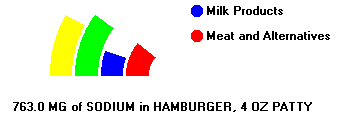
The following example indicates how such a sort would reorder the food list.
Initial Food List:                                              WHEN EACH FOOD IS SELECTED
                                                                THE BOTTOM LINE TELLS YOU:
1 unit  of 250 ML       of COFFEE, BREWED, MADE WITH DISTILLED WATER                    (COST DETAIL)
1 unit  of 1 MUFFIN     of FAST FOOD, BREAKFAST, ENGLISH MUFFIN WITH EGG+CHEESE+BACON   (COST DETAIL)
1 unit  of 1 BURGER     of HAMBURGER, LARGE, SINGLE PATTY, PLAIN                        (COST DETAIL)
1 unit of large (30-40) of FAST FOOD, POTATO, FRENCH FRIED IN BEEF TALLOW               (COST DETAIL)
1 unit  of 355 ML CAN   of SOFT DRINKS, COLA TYPE BEVERAGE WITH ASPARTAME               (COST DETAIL)
After Sorting by Total Fat
                                                                WHEN EACH FOOD IS SELECTED
                                                                THE BOTTOM LINE TELLS YOU:
1 unit  of 1 BURGER     of HAMBURGER, LARGE, SINGLE PATTY, PLAIN                         22.9 G FAT
1 unit  of 1 MUFFIN     of FAST FOOD, BREAKFAST, ENGLISH MUFFIN WITH EGG+CHEESE+BACON    19.8 G FAT
1 unit of large (30-40) of FAST FOOD, POTATO, FRENCH FRIED IN BEEF TALLOW                18.5 G FAT
1 unit  of 355 ML CAN   of SOFT DRINKS, COLA TYPE BEVERAGE WITH ASPARTAME                 0.0 G FAT
1 unit  of 250 ML       of COFFEE, BREWED, MADE WITH DISTILLED WATER                      0.0 G FAT
After Sorting by Sodium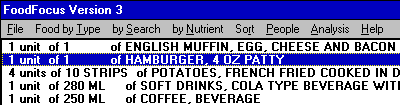
                                                                WHEN EACH FOOD IS SELECTED
                                                                THE BOTTOM LINE TELLS YOU:
1 unit  of 1 MUFFIN     of FAST FOOD, BREAKFAST, ENGLISH MUFFIN WITH EGG+CHEESE+BACON    784.0 MG SODIUM
1 unit  of 1 BURGER     of HAMBURGER, LARGE, SINGLE PATTY, PLAIN                         474.0 MG SODIUM
1 unit of large (30-40) of FAST FOOD, POTATO, FRENCH FRIED IN BEEF TALLOW                187.4 MG SODIUM
1 unit  of 355 ML CAN   of SOFT DRINKS, COLA TYPE BEVERAGE WITH ASPARTAME                 21.3 MG SODIUM
1 unit  of 250 ML       of COFFEE, BREWED, MADE WITH DISTILLED WATER                       2.5 MG SODIUM
For a diverse food list, if you repeatedly sort by need and add more of foods (or of similar foods) at the top of the list while getting less of (or deleting) foods at the bottom of the sorted list, does the overall nutrient content (happy face) improve? Is this a useful strategy?
How to define how many people will eat the foods in the food list.... Recommended Nutrient Intake.....
Comments to matt@foodfocus.com