14. Customizing FoodFocus
In this lesson you will learn how to select options that determine how
FoodFocus operates.
Objectives
After this lesson, you will be able to:
- Display nutrient analysis summary in a simple (Report Card Marks) manner.
- Set the number of days on which Recommended Nutrient Intake calculations
should be based.
- Determine the order in which foods listed by Type, by Search and by
Nutrient are first displayed.
- Enable the editing of food nutrient data as well as nutrient and disease
help information.
Lesson
Some of the features which you can control include:
- Report Card Marks- Report card marks were
developed as an alternative to the "Percent of Calories from ...."
and the "Fibre(% of Target)" nutrient summary indicators. These
indicators are similar to marks on a student report card except that you
can get more than 100 on this report card. A mark of 100 means that nutrient
recommendations are met. Values less than 100 mean that the food may be
less healthy and values more than 100 mean that the objectives of nutrient
recommendations have been exceeded. See lesson 1c
for an example of both methods of display.
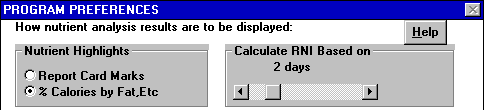
- Calculate RNI Based on ? Days- You can
click on the arrows at each end of the horizontal bar or drag the indicator
on the bar. The range is 1 to 7 days.
- Automatic Sort of Foods Selected by Type...- Three
options about the order in which foods selected by Type, by Search and
by Nutrient are displayed include:

- By Name- This is the default order as most users prefer to see foods
listed alphabetically.
- By Need- This is the same as using the by Need sort described in lesson
11. This is useful when you are considering different foods and you
want foods to be near the top of the list that are most likely to be good
choices (considering foods you have already selected and your nutrient
guidelines).
- No Sort- If you have a very slow computer, you may find that this option
is noticeably faster. A disadvantage is that not all foods (especially
any foods you add) will not necessarily be in alphabetical order.
- Editing Food Data- When you click on the
options to allow editing of food data, you will be allowed to access displays
from which foods can be added or data for existing foods can be edited.
Note that food data is stored in two groups (basic or custom) to provide
a balance between keeping files unchanged for data security and changing
files for flexibility. Refer to the FoodFocus manual for further information.
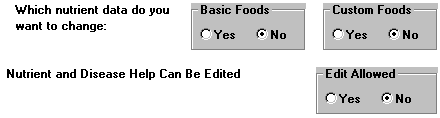
- Editing Help Information- When you click
on the option to allow editing of nutrient and disease information, you
will be allowed to edit most help displays. You must use the Save Changes
to File button on the help displays to ensure that changes to help information
are retained. Refer to the FoodFocus manual for further information.
Review Topics
- For what users would the Report Card Marks options be useful?
- What is the range of days that can be chosen for recommended nutrient
intake calculations?
Independent Practice
Design an exercise that would require the use of individual daily food
records and analysis as a combined weekly food record and analysis.
Coming Next....
Another quiz.....
Comments to matt@foodfocus.com