7. Choosing Food by Nutrient- Good Sources of .....
At times it is helpful to be able to select foods
that have relatively large amounts of a certain nutrient.
Objectives
After this lesson, you will be able to:
- Select foods using "by Nutrient" on the main menu.
- Explain the advantages and disadvantages of selecting foods based on
nutrient content alone.
- Quickly compare the nutrient content of good sources of selected nutrients.
Lesson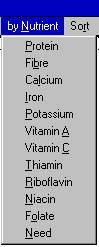
- Go to FoodFocus. To see both this tutorial and FoodFocus at the same
time or to review how you can switch between this tutorial and FoodFocus,
see the description in lesson 5.
- Using the mouse click on "by Nutrient"
on the menu line and you will get a drop down list of the nutrients you
can use to select foods. [Note that you can also press the ALT key on your
keyboard, and then press "N",
to do the same thing.]
- You start the search by clicking on a nutrient in the list of nutrients.
Note that:
- You can also use the up/down keys on your keyboard to select
a nutrient and then press the ENTER key on your keyboard to start the search.
- This search is based on a certain amount of each food (100 grams).
In some cases (such as spices) that may not be a practical amount.
- Some foods may not be a healthy choice for other reasons
so although search by nutrient is a powerful technique, it is not a replacement
for practical judgement.
- Searches may result in lists of foods that are longer than the window
can display at once. Refer to lesson 6 for
a description of how to move about in such lists.
- Select a food from the list as in lesson 5.
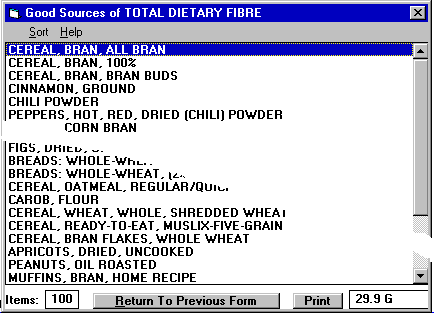 Note that:
- The lower right hand corner indicates the quantity of the search nutrient found in the food
that is selected (ie highlighted in blue). Use the up/down keys to select different foods and
see the nutrient quantity change in the lower right corner.
- This nutrient quantity is per 100 grams of that food.
- Enter the quantity of the food as in lesson
5.
- You can see the nutrient data for that one food
by clicking on the "Show Nutrient Data" button. Lesson 3
described how to see the overall nutrient data for all the foods you have
selected. In this case, you can see data for just one specific food. See
lesson 8 for more information about viewing
nutrient data for one food.
- You add the selected food to the food list by clicking on the "Add
to Food List" button with the mouse as in
lesson 5.
The list of foods (lesson 1b), the summary description
(lesson 1c)and the pictographs (lesson
2) update to reflect this food and you can see the detailed analysis
results (lesson 3).
Review Topics
- How many nutrients can you choose from for a "by Nutrient"
search?
- When you display a list of foods selected "by Nutrient",
how can you quickly tell the amount of the search nutrient in each food
listed?
- How can you view all the foods in a long list?
- Using the keyboard only (absolutely no mouse movements or clicks),
how many keystrokes are needed to compare the amount of fibre in the top
three best sources of fibre (numerically speaking)?
- What are four considerations in deciding if foods listed in a "by
Nutrient" search are really an appropriate source of that nutrient
for you?
Independent Practice
Using a "by Nutrient" search for good sources of folate (which
is important for healthy babies), identify several good animal and vegetable
sources. Compare the amount of folate in chickpeas and in red kidney beans.
Using a "by Nutrient" search for good sources of Vitamin C, identify
the two top vegetable sources of Vitamin C and compare the Vitamin C in
those two vegetables with the Vitamin C in a raw orange (per 100 grams).
Coming Next....
Making changes to the quantities of food you have selected....
Comments to matt@foodfocus.com